
Verify contractor devices before Microsoft 365 access — without MDM or VDI
Ensure verifies unmanaged contractor and third-party devices before Microsoft 365 access, so you can retire VDI without weakening security. It works with Entra Conditional Access and does not require Intune enrollment on personal devices.
OUTCOME COMPARISON
Migration stalls. VDI stays running for contractors.
Contractor access moves to M365. VDI can be decommissioned.
Illustrative outcomes based on typical customer deployments.
How device verification works inside your Entra access flow
Five-step verification flow
Device Verification Flow
Broker Device
Personal laptop
Ensure Check
Posture verified
Identity Provider
Okta / Entra ID
Protected App
Access granted
Broker Device
Personal laptop
Ensure Check
Posture verified
Identity Provider
Okta / Entra ID
Protected App
Access granted
Contractor attempts to access Microsoft 365
No change to your existing sign-in flow, MFA, or user identity experience.
Ensure checks device posture
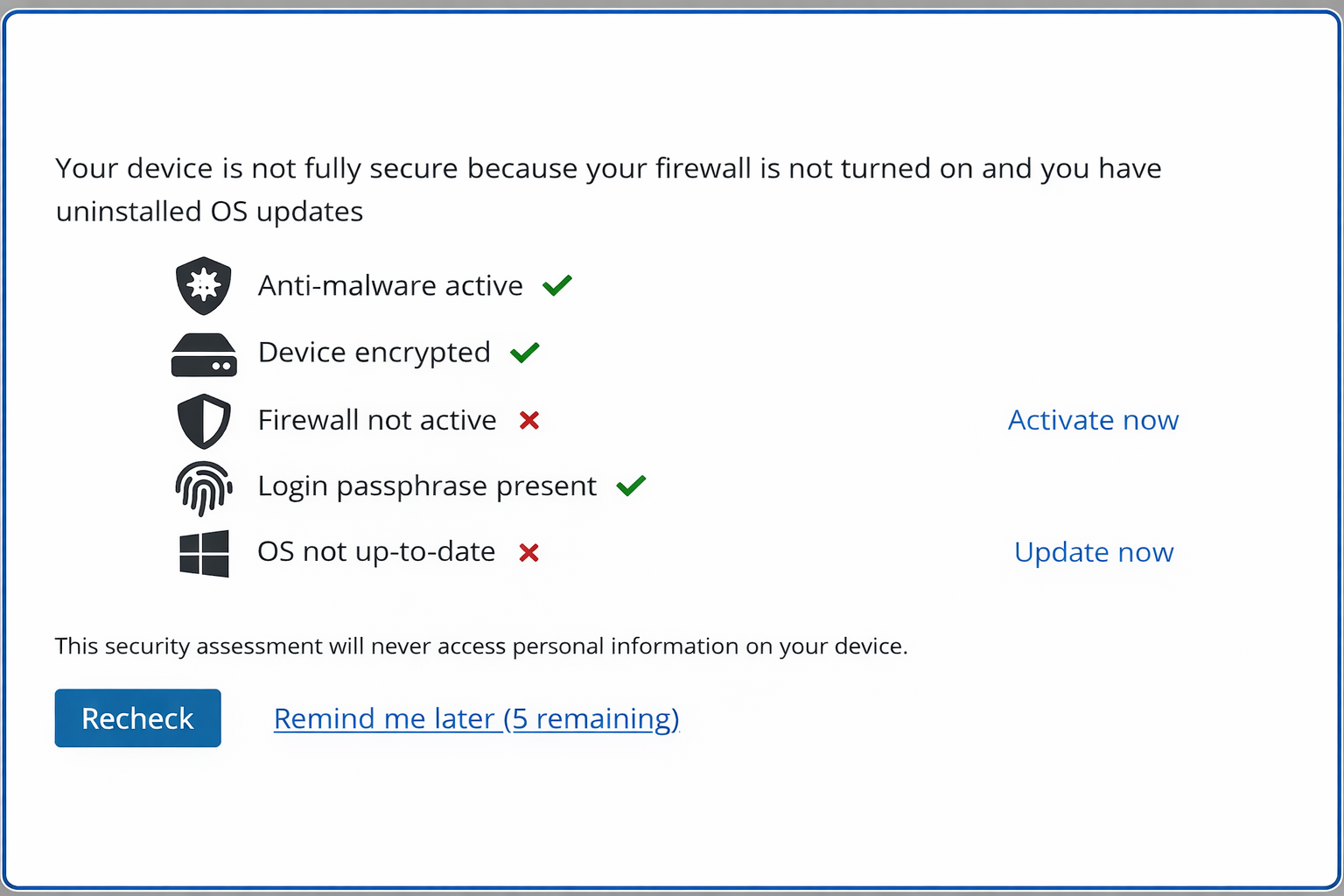
A lightweight agent verifies key controls such as encryption, antivirus, firewall, OS version, and screen lock.
Entra Conditional Access evaluates the result
Ensure sends a compliance signal into Entra Conditional Access so your existing policies can grant or block access.
Noncompliant devices get guided remediation
Users see clear fix steps and can usually resolve issues themselves in minutes without help desk involvement.
Evidence is logged automatically
Every check creates a time-stamped record of the result, controls evaluated, and remediation outcome.
Why "just use Intune for B2B guests" breaks down
Cross-tenant enrollment is often blocked
The contractor's organization must allow MDM enrollment from an external tenant. Most do not.
Privacy and legal objections slow rollout
Enrollment places a management profile on personal or employer-owned devices, creating privacy, legal, and HR friction.
Ensure verifies devices without enrolling them
A lightweight agent checks device controls without adding an MDM profile, remote management, or remote wipe capability.
If a device fails, the user gets clear fix steps
Most issues are resolved in minutes, without a help desk ticket or a stalled onboarding process.
CUSTOMER RESULTS
A regulated enterprise moved 2,000+ contractors off VDI and into Microsoft 365 in 8 weeks
Every access check creates audit-ready evidence
Exportable records for ISO 27001, NYDFS, and other control frameworks. See the compliance evidence page →
Sample audit log
Frequently Asked Questions
Still have questions?
Talk to our team about your specific compliance or distribution requirements.
Talk to Our TeamEvaluating the full cost of keeping VDI for contractors?
See the VDI Replacement Cost ComparisonSee the Entra Conditional Access flow live
We will walk through contractor sign-in, device verification, remediation, and a sample audit report. No slide deck.